Confidentiality
Can Texas Lawyers Upload Client Files to ChatGPT?
June 2, 2026
By Stephen Walther
Founder of DraftWorks, former Microsoft product manager, and State Bar of Texas approved MCLE sponsor
ChatGPT makes it dangerously easy for lawyers to expose client information. Texas Opinion 705 does not ban AI, but it does require law firms to understand the risks before anyone uploads a client file.
Can Texas Lawyers Upload Client Files to ChatGPT?
A lawyer does not need to upload a smoking-gun memo to create a confidentiality problem.
A deposition excerpt. A medical chronology. A settlement summary. A “sanitized” fact pattern with the client’s name removed. Any of these can reveal more than the lawyer intended, especially when combined with dates, locations, job titles, family relationships, medical details, or business facts.
That is why Texas Opinion 705 puts confidentiality at the center of the AI discussion. The opinion warns:
Some of the greatest risks posed by the unthinking use of generative AI relate to confidentiality of client information. 1
That warning is not aimed only at careless lawyers pasting privileged memos into a chatbot. It is aimed at a more ordinary problem: lawyers using powerful tools without fully understanding what information is being shared, how long it is retained, whether it may be used to improve the tool, and whether one client’s information can be kept separate from another’s.
Texas lawyers are not forbidden from using generative AI. But they are responsible for understanding the confidentiality risks before entering client information into an AI system.
This article answers a practical question for Texas law firms: how can lawyers use ChatGPT without exposing client information? The answer starts with ChatGPT’s privacy, memory, training, and retention settings. But as those settings show, safe use requires more than caution. It requires a workflow designed for the way law firms actually handle client matters.
Two Confidentiality Risks
When lawyers think about confidentiality risks, they often picture the dramatic version: an internal memo splashed across the front page of the New York Times, a privileged email forwarded to the wrong person, or a document that effectively says, “He did it.”
But ChatGPT creates a quieter problem.
The danger is not limited to uploading a privileged memo. It can begin with a deposition excerpt, a medical chronology, a settlement summary, a criminal fact pattern, or a few paragraphs from a draft motion.
For Texas law firms, there are two confidentiality risks to keep separate: disclosure outside the firm and contamination across client matters.
Disclosure outside the firm
The first risk is that client information leaves the law firm without the client’s informed consent or some other legal basis for disclosure.
That risk is broader than many lawyers assume. A lawyer may reveal client information without uploading the client’s entire file. A prompt can disclose the client’s legal problem, business strategy, medical condition, criminal exposure, settlement posture, or weaknesses in the case.
In other words, the confidentiality risk is not limited to dramatic mistakes. It can arise from the ordinary details lawyers use every day to get useful work done.
Contamination across matters
The second risk is more subtle: information from one client matter can leak into another.
A law firm would never intentionally drop one client’s file into another client’s folder. But poorly controlled AI workflows can create a digital version of the same problem. Chat history, memory features, shared accounts, reusable projects, pasted prompts, uploaded files, and informal workflows can all blur matter boundaries.
That matters because client information is often useful precisely because it is specific. A blood alcohol level, a negotiation position, a family-law allegation, a medical diagnosis, a defense theory, a business vulnerability, or a witness credibility issue may be harmless in isolation. In the wrong context, it can become revealing.
Law firms already understand the need to separate client files. The same principle applies to AI. Client information should not be pooled together in a general-purpose chat environment and trusted to sort itself out later.
Why “I Removed the Name” Is Not Enough
Many lawyers assume ChatGPT is safe for brainstorming as long as they do not upload documents or type the client’s name.
That assumption is dangerous.
Useful legal brainstorming usually requires facts. Not abstract facts. Specific facts. Dates. Locations. Medical conditions. Job titles. County names. Family relationships. Criminal allegations. Settlement ranges. Business pressures. Opposing parties. Judge preferences. Witness problems.
The more useful the prompt, the more likely it is to contain client information.
Removing the client’s name does not solve the problem. “Nonconfidential” facts can become identifying when combined. Latanya Sweeney’s classic privacy research found that ZIP code, date of birth, and sex could uniquely identify a large share of the U.S. population. 2 Harvard summarized the finding this way: 87% of the U.S. population could be identified from those three data points, based on Sweeney’s analysis of 1990 Census data. 3
The lesson for law firms is simple: anonymization is a weak guardrail.
It asks every lawyer, in every prompt, on every matter, to decide which facts are safe enough to share. That is not a system. That is a bet.
A law firm would not ask every lawyer to become a cryptography expert before sending email. The firm provides a secure email system. The same principle should apply to AI.
If the work is client-related, the safer starting point is to treat the facts as confidential and use tools designed around that assumption.
ChatGPT Confidentiality Settings
Can a Texas lawyer use ChatGPT with confidential client information?
In theory, yes.
In practice, this is where things get messy.
ChatGPT is not one privacy setting. It is a collection of settings involving model training, saved memories, chat history, uploaded files, temporary chats, projects, retention, and account type. A lawyer who uses ChatGPT for client work must understand which edition is being used, which settings are enabled, what is being saved, what may be used later, and whether one matter can influence another.
That is a lot to ask of a busy lawyer trying to draft a motion before dinner.
Model Training Controls
The first setting to check is Improve the model for everyone.
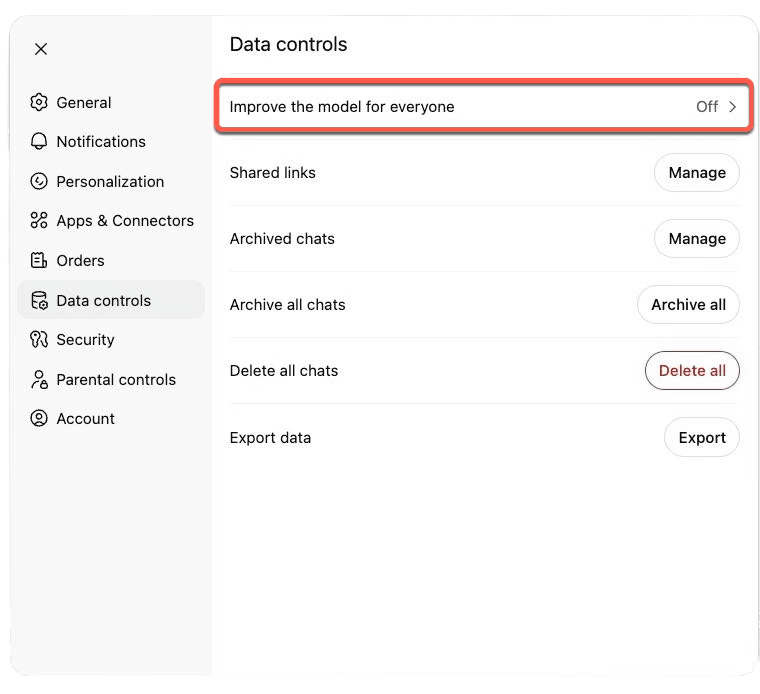
If you are using a personal edition of ChatGPT, such as ChatGPT Free, Plus, or Pro, data sharing is enabled by default. You can turn it off under Settings > Data Controls > Improve the model for everyone.
This setting matters because, when it is enabled, OpenAI may use your chats, uploaded files, and related feedback to improve its models. The point is not that a future version of ChatGPT will quote your prompt back to another user. The point is simpler: client material may enter a model-improvement process controlled outside the law firm.
For lawyers, that is a serious line to cross.
ChatGPT Business and ChatGPT Enterprise are different. OpenAI says business data is excluded from training by default. That is an important protection, but it does not solve every confidentiality problem. Turning off model training does not automatically solve memory, chat history, file retention, or matter-separation risks.
Reference Saved Memories
ChatGPT can also remember facts about you across conversations.
That is useful when ChatGPT remembers your writing style, your business goals, or your preferred tone. It is dangerous if ChatGPT remembers facts from client matters.
Imagine asking ChatGPT to help with a motion to suppress in Matter A. Later, you ask for help with a similar motion in Matter B. If memory is enabled, you do not want facts, assumptions, or strategy from Matter A shaping the response in Matter B.
That is the contamination problem.
A law firm would never intentionally mix two client files. But saved memory creates a way for information from one matter to influence another matter unless the setting is understood and controlled.
You can view and disable saved memories under Settings > Personalization > Reference Saved Memories.
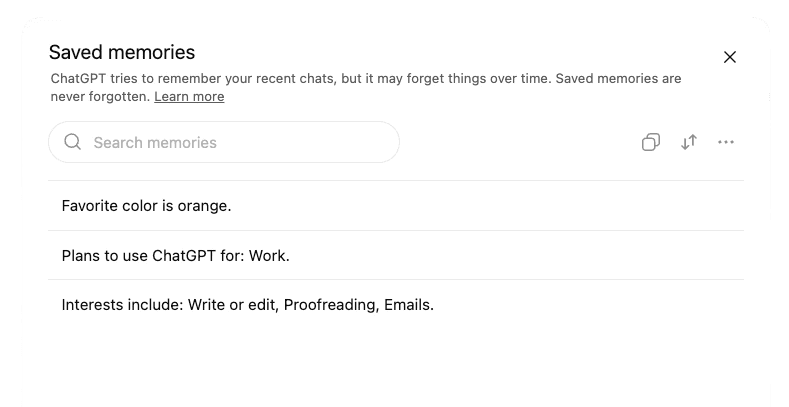
Reference Chat History
Saved memories are not the only personalization risk.
ChatGPT may also reference prior conversations when Reference Chat History is enabled. That means a new chat is not necessarily a clean slate. Relevant information from earlier chats may be used to personalize later responses, even when those chats are in different threads.
For ordinary personal use, that is convenient. For legal work, it is dangerous.
A lawyer may discuss a criminal case in May, a family-law matter in June, and an employment dispute in July. If ChatGPT is allowed to draw from prior chats, the lawyer has to trust the system to decide what past information is relevant and what past information should stay buried.
That is not how law firms should handle client boundaries.
The safe assumption is that client matters should not share memory. If ChatGPT is being used for client work, Reference Chat History should be treated as a matter-contamination risk, not a productivity feature.
You can disable it under Settings > Personalization > Reference Chat History.
Data Retention
Turning off model training does not make the conversation disappear.
That is the next trap.
A lawyer might turn off Improve the model for everyone and assume the problem is solved. It is not. That setting controls whether the content may be used to improve OpenAI’s models. It does not mean the chat instantly vanishes from OpenAI’s systems.
By default, ChatGPT conversations are saved to the user’s account until the user deletes them. Once a chat is deleted, OpenAI says it is generally scheduled for permanent deletion from its systems within 30 days, unless OpenAI must keep it longer for security or legal reasons.
Temporary Chat is different, but not magic. OpenAI says Temporary Chats are automatically deleted from its systems within 30 days. That is better than leaving client conversations sitting in the sidebar, but it still means the content may exist outside the firm for a period of time.
Files create another problem. ChatGPT chats and uploaded files are managed separately. Deleting a chat does not necessarily delete a file saved to the user’s Library. Files uploaded to projects or custom GPTs may remain until the project or GPT is deleted.
For a law firm, this matters. The risk is not only that a lawyer accidentally trains a future model. The risk is that client information may remain in an account, in a file library, in a project, in a backup, or under a legal hold after the lawyer thought the issue was over.
There is a stronger option: Zero Data Retention.
But Zero Data Retention is not a button in a personal ChatGPT account. OpenAI makes Zero Data Retention available only to approved customers for eligible API usage. In other words, it is an enterprise procurement and architecture decision, not something an associate can fix at 11 p.m. inside ChatGPT settings.
Even then, Zero Data Retention has limits. Some API features store application state. Some endpoints are not eligible. And OpenAI’s own documentation says legal obligations can override ordinary retention practices.
That last point is not theoretical.
In the New York Times litigation against OpenAI, a court order required OpenAI to preserve certain ChatGPT and API content that otherwise would have been deleted. OpenAI later said The Times initially demanded that 1.4 billion private ChatGPT conversations be turned over.4 OpenAI later announced that it was no longer under the order to retain new consumer ChatGPT and API content indefinitely, and that its obligations under the earlier order ended on September 26, 2025.
This proves the larger point: retention policies are not force fields. A court can change the practical reality overnight.
For law firms, the lesson is simple. Do not confuse “not used for training” with “not retained.” Do not confuse “deleted from my sidebar” with “gone.” And do not build a confidentiality system that depends on every lawyer remembering the difference.
ChatGPT Projects
ChatGPT Projects look like they were built for law firms.
A project gives you a dedicated workspace. You can create one project for one client matter. You can upload relevant documents, add matter-specific instructions, keep related chats together, and invite other lawyers or staff members to collaborate.
That is exactly how lawyers already think: one matter, one file.
So far, so good.
The problem is that a project can look like a sealed client-matter folder without actually behaving like one.
When you create a new project, ChatGPT lets you choose between Default memory and Project-only memory. That choice matters. With project-only memory, ChatGPT can use chats inside the project, but it should not reference conversations outside the project. With default memory, the boundaries are looser.
For a law firm, that is not a minor setting. It is the setting that determines whether the project is actually isolated from other work.
And it is easy to miss.
The memory option appears when the project is created, behind a small settings control, at exactly the moment when most lawyers are thinking about the matter name, the uploaded documents, or who needs access. They are not thinking about whether ChatGPT’s memory system might reach outside the project.
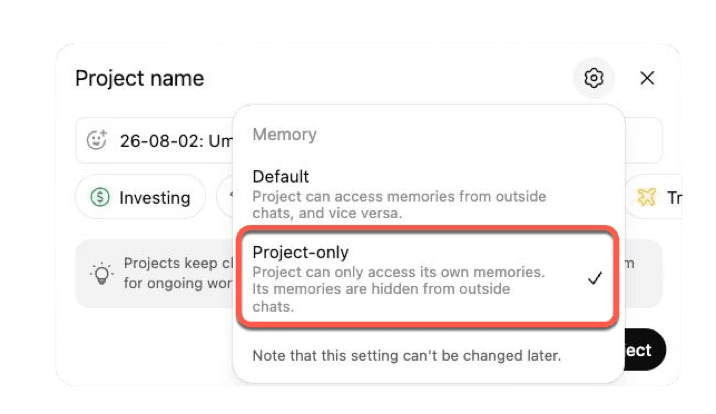
That is the danger. Projects seem like the safe answer for client matters, but they are too easy to misconfigure.
Worse, project-only memory can only be selected when starting a new project. If a project was created with default memory, you cannot simply flip a switch later and turn it into a project-only workspace.
A feature that looks like a client-matter folder should not depend on every lawyer noticing the right memory setting at the moment of creation.
Client boundaries should be enforced by the system, not recreated by hand every time someone starts a new project.
Who Still Has Access?
There is one more confidentiality problem that law firms already understand: people leave.
A lawyer laterals to another firm. A paralegal resigns. A contract attorney finishes the project. A summer associate goes back to school.
When that happens, the firm needs to cut off access to client information.
That is straightforward when the information lives inside firm-controlled systems. Disable the user in Google Workspace, Microsoft Entra, Okta, or another identity system, and the former employee loses access to firm email, firm documents, and firm applications.
ChatGPT can work this way too, but only if the firm is using a managed workspace with real administrative controls.
With ChatGPT Business or Enterprise, a law firm can manage members inside a workspace. With Enterprise, the firm can go further and integrate ChatGPT with identity and provisioning systems, so users can be added and removed through the same access-management process used for other firm systems.
That matters because access control is not an abstract IT issue. It is a confidentiality issue.
If a lawyer used a personal ChatGPT account for client work, the firm has a serious problem. The chats, uploaded files, saved memories, and project materials may live in that lawyer’s personal account. The firm may not know what was uploaded. It may not be able to audit it. It may not be able to delete it. And when the lawyer leaves, the firm may have no practical way to cut off access.
That is not a small administrative gap. It is a client-file problem.
A law firm would not let lawyers store client documents in personal Dropbox folders and hope everyone remembers to clean them up later. The same principle applies to ChatGPT.
If client information is going into an AI system, the firm needs to control the account, the users, the sharing settings, the retention policy, and the offboarding process.
Otherwise, the firm has not adopted an AI tool. It has scattered pieces of client files across personal accounts it does not control.
Do Not Rely on General-Purpose Chat for Client Work
At this point, the conclusion should be clear.
A law firm should not rely on consumer ChatGPT for client work.
That is not because generative AI is useless. It is because consumer ChatGPT is a general-purpose tool. It was built for everything: vacation itineraries, recipes, coding help, birthday poems, school projects, business brainstorming, and casual research.
That is exactly the problem.
Client work is not casual research. A law firm needs matter separation, retention rules, access controls, audit trails, document controls, user permissions, and a clear way to remove access when someone leaves the firm.
Those are not optional features. They are the infrastructure of confidentiality.
The mistake is thinking of AI as a chatbot. For a law firm, AI should be a controlled professional system.
That usually means creating a purpose-built frontend that uses the OpenAI API behind the scenes. In plain English, the firm builds its own AI tool for lawyers, while OpenAI’s models do the AI work in the background.
Lawyers should not have to manage a maze of ChatGPT settings every time they work on a client matter. The system should enforce the rules automatically.
A properly designed law firm AI tool can require a matter number before use. It can keep each matter in its own workspace. It can prevent memory from leaking across clients. It can control who has access. It can limit retention. It can log activity. It can restrict which documents may be uploaded. It can apply different workflows for litigation, transactions, investigations, or client intake.
That is the difference between consumer AI and professional AI.
Consumer AI asks the lawyer to remember the rules.
Professional AI builds the rules into the tool.
Consumer AI asks the lawyer to remember the rules.
Professional AI builds the rules into the tool.
The confidentiality benefits are only the beginning. Once a firm builds a custom frontend, it can also build in the workflows that make the firm valuable.
Every law firm has its own way of handling matters. How it builds chronologies. How it reviews documents. How it prepares witnesses. How it drafts discovery. How it evaluates claims. How it prepares status reports. How it turns messy client facts into legal strategy.
That is the firm’s operating system.
A custom AI tool can encode that operating system. Not to replace lawyers, but to remove the repetitive work that keeps lawyers from focusing on judgment.
The programming is not the hard part. Calling the OpenAI API from a custom frontend is straightforward for a competent developer. The hard part is translating the firm’s legal judgment, workflows, risk tolerance, and confidentiality requirements into a system lawyers will actually use.
That is where the value is.
A law firm does not need a chatbot sitting outside its workflow. It needs AI inside the workflow, governed by the same discipline the firm already applies to client files, email, document management, conflicts, and access control.
The goal is not to avoid AI.
The goal is to stop treating serious client work like a chat session.
Conclusion: Build the Guardrails Before Uploading the File
Lawyers should not have to become experts in ChatGPT settings to protect client confidences.
That is the problem with using consumer ChatGPT for client work. The safe path depends on too many individual choices: the right account, the right training setting, the right memory setting, the right project setting, the right retention policy, the right access controls, and the right offboarding process.
That is not a confidentiality system. It is a checklist waiting to fail.
In software, there is a useful phrase: make users “fall into the pit of success.” The easiest thing to do should also be the right thing to do.
Law firms should apply the same principle to AI.
When a tired lawyer is working late on a critical matter, the lawyer should be focused on the law, not on whether ChatGPT’s latest settings are safe for client information.
The answer is not to avoid generative AI. The answer is to stop treating consumer ChatGPT as the right tool for serious client work.
Law firms should use AI through professional systems designed for legal work: systems that isolate matters, control retention, manage access, protect client data, and build the firm’s own workflows into the tool.
Do not ask every lawyer to rebuild the guardrails every time they open a chat window.
Build the guardrails first.
Footnotes
-
State Bar of Texas Professional Ethics Committee, Opinion No. 705, at 2 (Feb. 2025). ↩
-
Latanya Sweeney, Simple Demographics Often Identify People Uniquely, Carnegie Mellon University, Data Privacy Working Paper 3 (2000). ↩
-
Caroline Perry, “You’re Not So Anonymous,” Harvard Gazette (Oct. 18, 2011). ↩
-
OpenAI, “Reporting the Facts About the New York Times’ Lawsuit” (updated Dec. 16, 2025). ↩