AI Workflows
What Claude for Legal Means for Texas Law Firms
June 16, 2026
By Stephen Walther
Founder of DraftWorks, former Microsoft product manager, and State Bar of Texas approved MCLE sponsor
An introduction to Claude for Legal for law firm partners.
Lawyers tell themselves a noble story about their work. Every memo is a fresh act of judgment. Every contract review is a bespoke professional service. Every chronology, client update, diligence summary, and clause analysis deserves to be handcrafted like a shoe made by candlelight.
Sometimes that is true. But in every law practice, much of the work repeats. The names change, the facts change, the opposing party changes, but the underlying task often follows a pattern that the lawyer has performed many times before.
Earlier this month, Anthropic released Claude for Legal, a free and open-source collection of connectors, plugins, skills, and agents for common legal workflows. It covers commercial, privacy, product, corporate, employment, litigation, regulatory, AI governance, intellectual property, and legal education work. The important point for law firms is that these materials are not hidden inside a black box. They can be inspected, copied, modified, and adapted.
That matters because Claude for Legal is not just another AI chat tool. Lawyers already have plenty of those. The more interesting development is that legal work is being packaged into reusable AI workflows: repeatable processes that can apply an approved method, use the right source materials, generate a predictable output, and send the result to a lawyer for review.
This is the shift law firm leaders should be watching. AI does not merely help a lawyer type faster. Used properly, it turns the lawyer into a manager of AI agents. Instead of personally performing every step of a repeatable task, the lawyer designs the process, supervises the work, reviews the output, and improves the workflow over time.
That is not a demotion from professional judgment. It is an amplification of professional judgment. A lawyer who manages well-designed AI workflows can get more done, with more consistency, in less time, while still preserving the lawyer’s role as the person responsible for the final work product.
This article is written for law firm partners and leaders, not programmers. It explains what Claude for Legal is, why the real value is in reusable AI workflows, and why Texas law firms should start thinking less about “letting lawyers use AI” and more about building firm-approved workflows for the work their lawyers already do every day.
What is Claude for Legal?
Claude for Legal is not a single legal AI product. It is a collection of building blocks for legal AI workflows. Some of those building blocks connect Claude to legal systems. Some tell Claude how to perform a legal task. Some package those tasks for a practice area. Some run in the background like legal monitors.
| Building block | Plain-English meaning | Why partners should care |
|---|---|---|
| Connectors | Ways for Claude to access approved systems and data | AI becomes useful only when it can work with firm documents and systems |
| Skills | Reusable instructions for completing a legal task | Firm knowledge can be encoded into repeatable workflows |
| Plugins | Bundled packages of skills, connectors, and helpers | A practice group can have its own AI toolkit |
| Agents | Named workflows that perform a job | Some work can be monitored, routed, or repeated automatically |
The current Claude for Legal release includes practice-area plugins that bundle related skills, connectors, and workflows.
| Plugin | Description |
|---|---|
| commercial-legal | Reviews NDAs, vendor agreements, SaaS contracts, renewals, and business-facing contract summaries against an approved playbook. |
| privacy-legal | Helps with privacy impact assessments, data processing agreements, DSAR responses, processing activity reviews, and privacy policy drift. |
| product-legal | Reviews product launches, marketing claims, and product-risk questions before they create legal or regulatory problems. |
| corporate-legal | Supports M&A diligence, disclosure schedules, closing checklists, board consents, minutes, and entity compliance tracking. |
| employment-legal | Reviews hiring, termination, worker classification, leave, investigations, and employment policies across jurisdictions. |
| regulatory-legal | Monitors regulatory developments, compares new rules against existing policies, tracks deadlines, and prepares practical legal digests. |
| ai-governance-legal | Reviews proposed AI uses, vendor AI terms, impact assessments, AI policies, and governance gaps. |
| litigation-legal | Supports litigation workflows such as chronologies, claim charts, deposition prep, privilege logs, deadlines, holds, and brief drafting. |
| law-student | Helps law students brief cases, build outlines, practice IRAC answers, prepare for exams, and study through Socratic questioning. |
| legal-clinic | Helps legal clinics manage intake, student onboarding, deadlines, case handoffs, and structured supervision. |
| legal-builder-hub | Helps legal teams find, evaluate, and install community legal skills with a security review step. |
| ip-legal | Supports trademark clearance, freedom-to-operate triage, invention disclosure review, IP clauses, takedowns, open-source compliance, and renewal tracking. |
| cocounsel-legal | Connects Claude workflows to Westlaw and Practical Law research reports with linked legal citations. |
These plugins support connectors that allow Claude to work with approved systems. For example, a connector to iManage, Google Drive, Box, or Ironclad can allow a workflow to use documents already stored in the systems a legal team uses every day.
| Connector type | Examples | Why it matters |
|---|---|---|
| Document repositories | Google Drive, Box, iManage | AI workflows can work from firm documents, not pasted text |
| Contract systems | Ironclad, DocuSign CLM, Definely | Contract workflows can connect to existing contract processes |
| Litigation systems | Everlaw, Trellis, CourtListener | Litigation workflows can use litigation-specific sources |
| Work management | Slack, Jira, Asana, Linear | Legal workflows can connect to business teams and task systems |
Walkthrough: Reviewing an NDA
Let's make this concrete by walking through how you would use Claude for Legal to review an NDA.
After you install Claude for Legal, you need to perform a one-time cold-start interview before you can use each plugin. The /nda-review skill is contained in the commercial-legal plugin so you need to run the cold start for this plugin. You'll be asked about who will be using the plugin, and what type of practice you have.
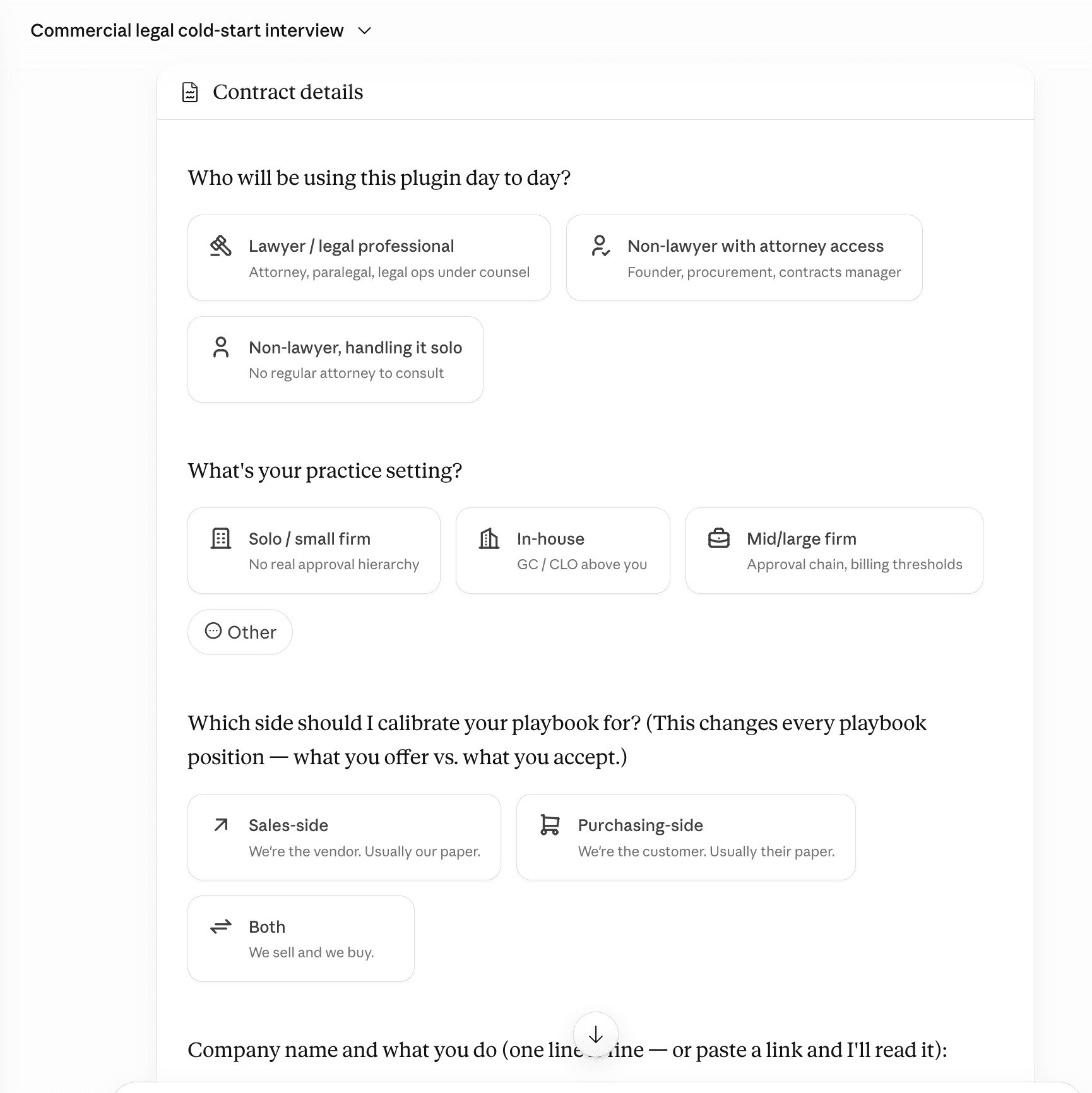
After you complete this one-time setup, you can review an NDA file by uploading it to Cowork and using a prompt like: "Can you review this NDA?"
Cowork will execute the /nda-review skill in the commercial-legal plugin and produce a report:
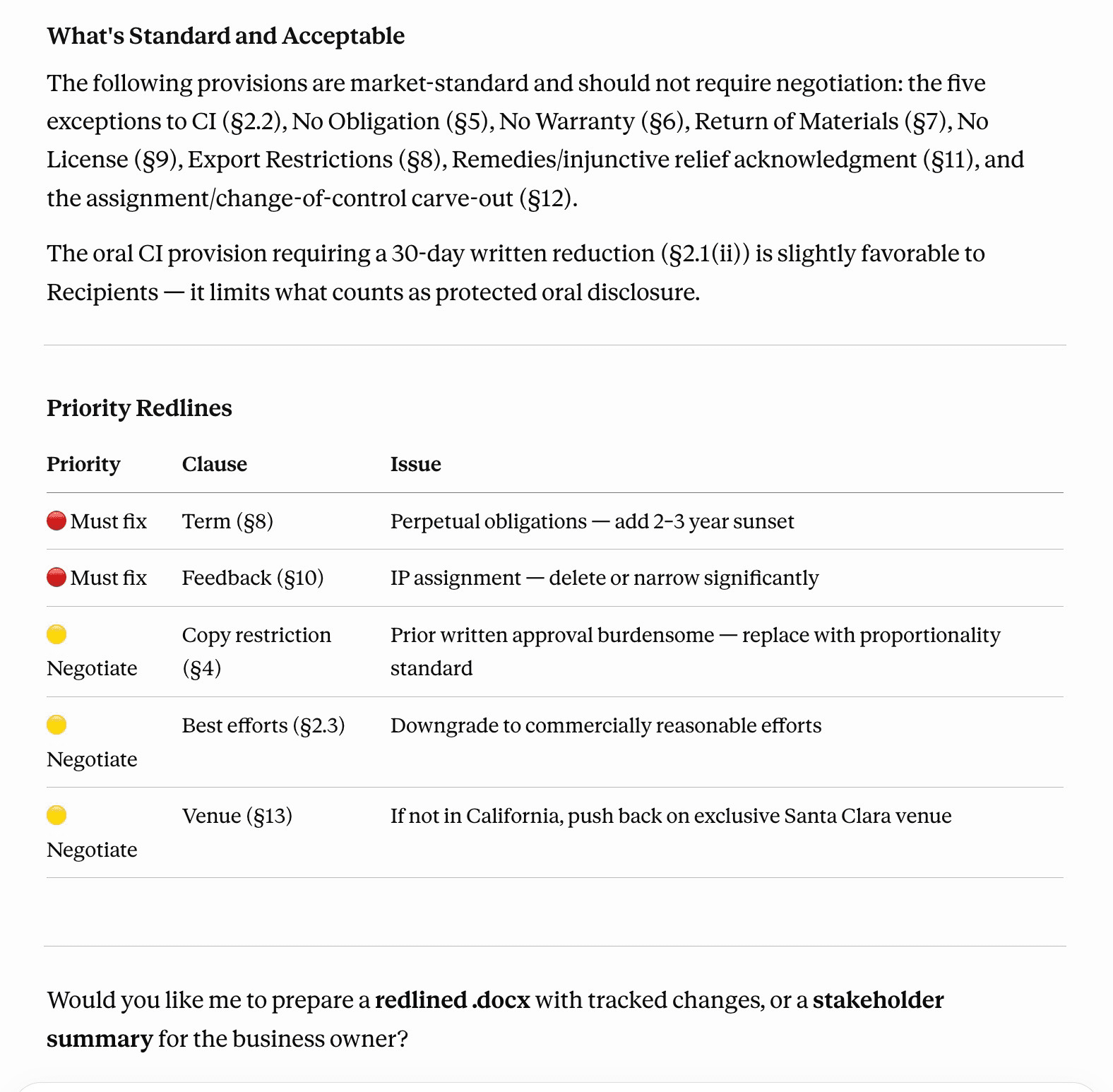
The important point is that the NDA review skill is not simply “summarize this contract.” It is a repeatable review process. The workflow asks what side the firm is on, applies the firm’s NDA playbook, identifies clauses that are acceptable or unacceptable, separates business issues from legal issues, and produces a triage report for lawyer review.
Notice that Cowork has flagged two issues with a priority of "Must fix" and three issues with a priority of "Negotiate."
That is useful, but it is also where law firm leaders should pause. If every lawyer runs this kind of review differently, the firm has not created a workflow. It has created another place for improvisation. The real opportunity is to turn the NDA review into a firm-approved process: approved playbook, approved inputs, approved output format, and required lawyer review.
The value is in the AI workflows
The most valuable part of Claude for Legal is not that it gives lawyers another place to chat. Lawyers already have plenty of places to chat with AI. The real value is that Claude for Legal shows how legal work can be packaged into reusable workflows.
In Claude for Legal, many of these workflows are implemented as Claude skills. A skill is essentially a written set of instructions that tells Claude how to perform a particular legal task. The important point is that these are not mysterious pieces of software buried inside a vendor’s black box. They are mostly written in plain English, in a format that a lawyer can read and understand. For example, the NDA review skill is a set of instructions for how Claude should approach an NDA review.
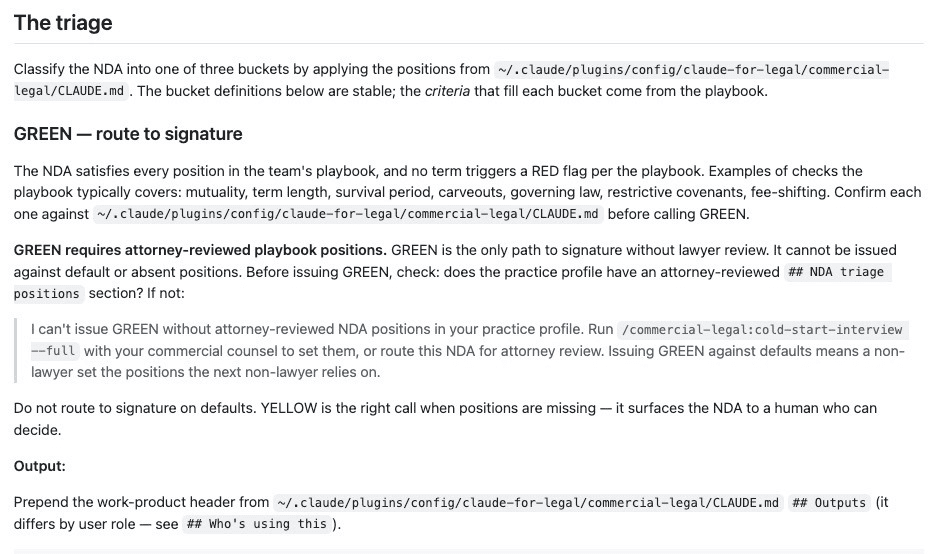
That may sound simple, but it is powerful. A good legal skill can encode the firm’s way of doing work: what documents to review, what risks to flag, what issues require escalation, what format the answer should take, and when the result must be sent to a lawyer for review. In other words, the skill becomes more than a prompt. It becomes a reusable version of the firm’s judgment about how a recurring legal task should be handled.
Even better, Anthropic released these materials as free and open-source under the Apache 2.0 license. That means a law firm is not limited to admiring them from a distance. The firm can inspect them, copy them, modify them, and adapt them to its own practice. A small firm can use them as a starting point. A larger firm can adapt them to its own playbooks, templates, approval rules, and client requirements.
That is the opportunity. The goal is not for every lawyer to sit alone at a keyboard, asking a chatbot to help draft one document at a time. The better model is for the firm to identify the work that repeats, turn that work into approved AI workflows, and then let lawyers supervise, review, and improve those workflows over time.
This is how AI changes the leverage of a law practice. The lawyer is no longer merely the person doing every step of the work by hand. The lawyer becomes the person who manages the process: designing the workflow, setting the standards, reviewing the output, and making sure the final work product reflects professional judgment.
Why law firms need firm-controlled AI workflows
Claude for Legal can be used inside Claude Cowork or Claude Code. Those tools are useful for testing, learning, and experimentation. But for most law firms, I would not make a general chat interface the center of the firm’s AI strategy.
The better approach is to take the useful parts of Claude for Legal, especially the skills, and run them inside a workflow the firm controls.
Here is the distinction:
| Type of AI workflow | What it means |
|---|---|
| Platform AI Workflow | A workflow that runs inside a vendor’s general interface, such as Claude Cowork, Claude Chat, Claude Code, or another legal AI platform. |
| Firm-Controlled AI Workflow | A workflow that runs inside a process the law firm controls, including matter selection, document access, permissions, output format, lawyer review, audit trail, and retention policy. |
This distinction matters because Texas lawyers do not merely need AI that works. They need AI that can be used responsibly.
Texas Opinion 705 does not require lawyers to avoid AI. It requires lawyers to use AI with competence, protect confidential information, verify AI output, supervise the use of the technology, and bill appropriately for the work performed. Those duties are much easier to satisfy when AI is implemented as a controlled workflow instead of as individual lawyers improvising in a chat box.
Consider matter confidentiality. In a platform chat interface, the lawyer may be responsible for remembering which matter they are working on, which documents they can upload, which sources are approved, and which prior context might be relevant. That is a lot to leave to habit and memory. A firm-controlled workflow can require the lawyer to select a matter before any document is uploaded. It can limit the documents available to that matter. It can apply the correct playbook. It can log what was reviewed and preserve the result in the appropriate place.
The same is true for lawyer review. It is not enough for an AI tool to generate a useful draft. The firm needs to know whether the draft has been reviewed, who reviewed it, what issues were flagged, and whether any part of the output still requires legal judgment. A custom workflow can build those review gates directly into the process. For example, an NDA review workflow can classify issues as acceptable, negotiate, or must fix, then require a lawyer to approve the final recommendation before it is sent to a client or business team.
That is why the most important question is not whether Claude for Legal works inside Claude Cowork. The more important question is whether the firm can turn these skills into approved workflows that reflect the firm’s own standards.
My recommendation is that law firms use Claude for Legal as a starting point, not as the final destination. The skills can be adapted and run behind a custom frontend, with the AI work handled through a backend API. That backend might use Anthropic’s Managed Agents API for long-running or scheduled workflows. For many ordinary workflows, it might use the standard Claude API. The technical choice matters less than the governance choice: the firm should control the matter context, the source documents, the review process, and the final output.
That is the difference between giving lawyers another AI tool and building an AI practice system.
Conclusion: stop handcrafting repeatable work
The future of legal AI is not every lawyer handcrafting every document from scratch. It is also not every lawyer wandering alone through a chatbot, hoping that a better prompt will produce a better answer. That is not a strategy. That is improvisation with a subscription.
The better future is law firms building reusable, versioned, lawyer-reviewed AI workflows around the work they already do every day.
Claude for Legal is valuable because it shows what this can look like. It takes common legal tasks and begins to package them as repeatable workflows: review the document, apply the playbook, flag the issues, produce the draft, and send the result to a lawyer for review. The skills are free and open-source, which means firms are not limited to waiting for a vendor to guess how their practice works. They can inspect the workflows, adapt them, and use them as a starting point for their own systems.
That is the opportunity for Texas law firms, whether solo, small, midsize, or large. AI does not eliminate the lawyer’s judgment. It gives that judgment more leverage. Instead of doing every step by hand, the lawyer can design the workflow, supervise the work, review the output, and improve the process over time.
In the old model, every lawyer is an individual contributor. In the new model, every lawyer can become a manager of AI workflows. The firms that learn that lesson first will not merely save time. They will build a new kind of practice: faster, more consistent, easier to supervise, and better prepared for the next decade of legal work.
The Blueprint is Free. The Infrastructure is Strategy. Anthropic has given law firms the raw building blocks for the future of practice, but open-source code doesn't come with enterprise governance, risk mitigation, or custom playbook integration.
If your firm wants to transition from individual chatbot improvisation to a secure, firm-controlled AI practice system without draining your billable hours, let's talk. Click here to schedule a strategic workflow audit for your firm